
Product images play a major role in online shopping. Customers cannot physically touch, examine, or try products before placing an order, so they depend heavily on photographs to understand what they are buying. A clean, attractive, and consistent product image can help an online store communicate quality, build customer confidence, and encourage purchasing decisions. However, preparing hundreds or thousands of product photographs for an ecommerce website can be a time-consuming process.
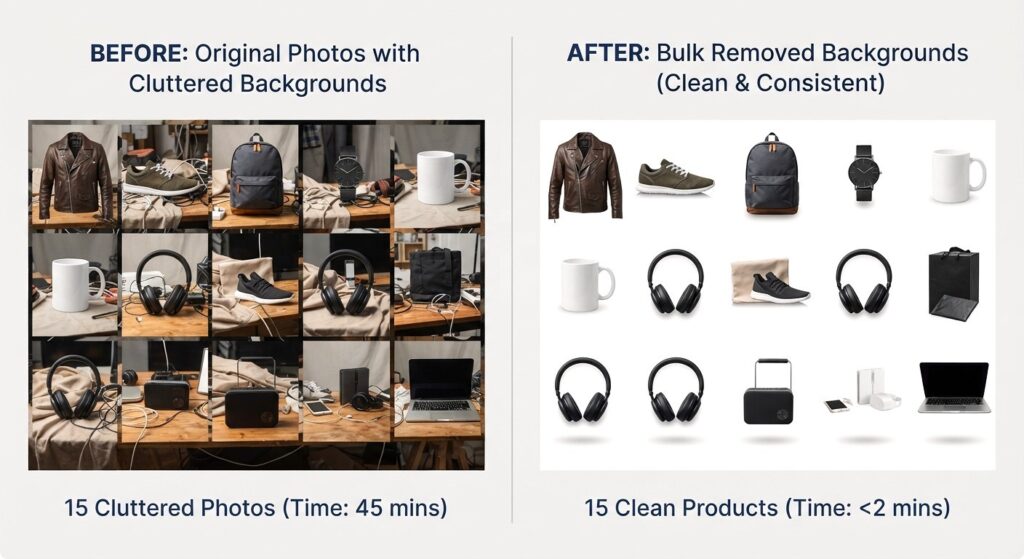
This is where bulk background removal for ecommerce websites becomes valuable. Instead of editing product photographs individually, businesses can process large collections of images through an organized background removal workflow. The result is a consistent collection of product visuals that can be used across online stores, marketplaces, catalogs, advertisements, and social media platforms.
Whether you operate a small online shop or manage a large ecommerce business, understanding bulk background removal can help you improve product presentation, streamline image preparation, and maintain a professional visual identity.
What Is Bulk Background Removal?
Bulk background removal is the process of removing unwanted backgrounds from multiple product photographs in a single organized workflow. The main objective is to separate each product from its original surroundings and place it against a clean, suitable background.
For example, imagine an online clothing store with 500 product images. Some photographs may have different studio backgrounds, while others might contain shadows, furniture, distracting objects, or uneven colors. Editing each photograph individually can require considerable time and effort.
A bulk editing workflow makes it possible to process these images systematically while maintaining consistent visual standards.
Depending on the product and the required result, background removal may involve:
• Removing colored, textured, or distracting backgrounds.
• Creating clean white or transparent backgrounds.
• Refining product edges for a natural appearance.
• Preserving important product details and original proportions.
• Maintaining consistent image dimensions and composition.
• Preparing images for ecommerce marketplaces and online catalogs.
The goal is not simply to erase everything behind a product. Professional editing should preserve the product’s natural appearance while making it stand out clearly.
Why Ecommerce Websites Need Consistent Product Backgrounds
Customers often compare several products before making a purchase. If product images on the same website have inconsistent backgrounds, lighting, and framing, the shopping experience can feel disorganized.
A consistent image presentation creates a more professional appearance and helps visitors focus on the products rather than unnecessary visual distractions.
1. Creates a Professional Store Appearance
A consistent background style helps product listings look organized. When customers browse multiple categories, they can see that the photographs follow a recognizable visual standard.
For example, a fashion store might display clothing against clean white backgrounds, while a furniture store may use carefully selected neutral backgrounds to highlight product shapes and materials.
This consistency can make a website look more polished and thoughtfully managed.
2. Helps Products Receive More Visual Attention
A busy background can compete with the product for attention. Unnecessary objects, strong colors, and distracting patterns may make important product details difficult to notice.
Removing the background reduces these distractions. Customers can concentrate on the product’s shape, color, texture, and design.
This is particularly useful for products with detailed features, such as watches, jewelry, footwear, cosmetics, and electronic accessories.
3. Supports Better Product Presentation
Different product categories have different visual requirements. A handbag needs clearly defined edges, while a transparent glass bottle requires careful treatment around its edges and reflections.
Professional background removal helps present these products more clearly without changing their essential appearance.
4. Makes Product Catalogs Easier to Maintain
An ecommerce website may receive new products every week. Without a standardized editing process, newly uploaded images can look different from older listings.
A consistent background removal workflow helps businesses maintain a recognizable appearance as their catalogs grow.
How Bulk Background Removal Works
A successful bulk editing project requires more than uploading a folder of photographs and removing their backgrounds. The images should pass through a structured process to ensure quality and consistency.
Step 1: Collect and Organize Product Images
The first step is preparing the source photographs. Images should be organized according to product categories, editing requirements, and output specifications.
For example:
• Clothing and fashion accessories.
• Jewelry and luxury products.
• Electronics and mobile accessories.
• Shoes and handbags.
• Cosmetics and skincare products.
• Furniture and home decoration.
Organizing photographs makes it easier to identify different editing requirements and reduces the possibility of processing errors.
Step 2: Analyze Image Complexity
Not every photograph can be edited using the same background removal technique.
A simple product with clearly defined edges may be suitable for automated processing. However, products with complicated outlines, transparent materials, reflective surfaces, or fine details may require manual refinement.
Examples include:
• Jewelry with small chains and intricate patterns.
• Shoes with thin laces and textured edges.
• Transparent glass bottles and containers.
• Clothing with delicate fabric and loose threads.
• Furniture with narrow gaps and complex structures.
Identifying these challenges before editing helps determine the appropriate workflow.
Step 3: Remove the Original Background
The original background is separated from the product using suitable editing techniques. Depending on the photograph, this may involve automated background removal, image masking, manual selection, or a combination of methods.
The editing method should be selected according to the product’s complexity and the expected output quality.
Step 4: Refine Product Edges
Edge refinement is one of the most important stages of professional background removal.
Poorly edited photographs may contain white halos, rough outlines, missing details, or unwanted background fragments. These problems can make the product look artificial.
Professional refinement focuses on:
• Preserving small product details.
• Removing unwanted edge pixels.
• Maintaining natural curves and outlines.
• Avoiding excessive feathering.
• Keeping the original product proportions intact.
Step 5: Apply a Consistent Background
After removing the original background, the product can be placed on a suitable replacement background.
Common options include:
Pure white background: Frequently used for clean ecommerce product listings.
Transparent background: Useful for flexible website layouts, graphic design, and promotional materials.
Light neutral background: Suitable for catalogs that require a softer visual appearance.
Custom background: Appropriate for marketing campaigns and selected product presentations.
The correct choice depends on the website’s design and the requirements of its sales channels.
Step 6: Check and Export the Final Images
Before delivery, edited images should be reviewed for accuracy, quality, and consistency. The final photographs can then be exported in the formats and dimensions required by the business.
A quality check should include:
• Correct product appearance.
• Clean and accurate edges.
• No remaining background fragments.
• Consistent image dimensions.
• Appropriate file format and color profile.
• Clear, balanced product presentation.
AI Background Removal vs. Professional Manual Editing
Automated background removal tools have made image preparation faster and more accessible. Many tools can identify a product and separate it from the background within seconds.
However, automation does not always produce perfect results.
The quality of automated processing depends on factors such as image resolution, lighting, background complexity, product shape, and transparency.
When AI Background Removal Is Useful
AI tools can be helpful when a business has a large number of straightforward product photographs.
They are particularly useful for:
• Simple products with clearly visible outlines.
• High-volume image preparation.
• Standard product photographs with sufficient contrast.
• Initial background separation.
• Projects with limited editing requirements.
Automation can reduce repetitive work, but every output should still be checked when image accuracy matters.
When Manual Editing Is Better
Manual editing is often more appropriate when a photograph contains complex edges or small details that automated tools may misunderstand.
For instance, a necklace with delicate chains may lose important parts during automated background removal. Similarly, transparent glass products can be difficult to separate accurately from their original surroundings.
Professional manual editing is valuable for:
• Intricate jewelry and accessories.
• Transparent and reflective objects.
• Products with fine edges or complicated shapes.
• Images requiring precise masking.
• Photographs where small visual imperfections are unacceptable.
Why a Hybrid Workflow Can Be Effective
For many ecommerce businesses, combining automated processing with professional manual refinement offers a practical solution.
Straightforward images can move through automated processing, while complicated photographs receive additional attention from experienced editors.
This approach can balance processing speed, consistency, and visual quality. The most suitable workflow depends on the number of photographs, product complexity, budget, and required delivery standards.
Industries That Benefit from Bulk Background Removal
Bulk background removal is useful across many ecommerce industries because most online stores depend on clear product photography.
Fashion and Apparel
Online clothing stores often manage large collections of shirts, dresses, jackets, trousers, and accessories.
Consistent background removal helps maintain a uniform appearance across product categories. It also makes it easier to display clothing details, patterns, and colors without unnecessary distractions.
Jewelry and Luxury Products
Jewelry photographs require careful editing because small details are essential to the product’s appearance.
Rings, bracelets, necklaces, and earrings may contain reflective surfaces, delicate chains, and intricate designs. Professional editing should preserve these details instead of cutting them away.
Electronics and Technology
Electronics stores sell products with different shapes, materials, and finishes. Smartphones, headphones, keyboards, cameras, and accessories benefit from clean product presentation.
Background removal helps create a consistent visual style across large product catalogs.
Shoes and Handbags
Footwear and handbag photographs often contain complicated outlines, straps, laces, handles, and stitching details.
Accurate edge refinement is important to prevent unwanted cuts or unnatural outlines.
Cosmetics and Skincare
Cosmetic products such as perfume bottles, skincare containers, makeup palettes, and beauty accessories often have reflective or transparent surfaces.
A clean background can help highlight packaging, product colors, and design details.
Furniture and Home Decor
Furniture products may contain narrow gaps, curved structures, and complex shapes. Removing the background can help create cleaner catalog images, particularly when products are photographed in busy studio environments.
Common Problems in Bulk Background Removal
Processing a large number of images can introduce quality problems if the workflow is not properly managed.
Rough or Incorrect Edges
One common problem is removing part of the product along with the background. This can happen when an automated tool cannot distinguish between similar colors or complicated shapes.
The solution is careful edge inspection and manual refinement where necessary.
Inconsistent Image Dimensions
If product images have different dimensions, they may appear uneven when displayed together on a category page.
Using standardized output dimensions and consistent positioning can improve the overall catalog layout.
Unnatural Shadows
Removing the original background may also remove shadows that help the product appear grounded.
Adding a suitable natural shadow can improve realism, but the result should not look excessive or artificial.
Color Changes
Some editing workflows may unintentionally affect product colors. This is especially problematic for clothing, cosmetics, and products where customers depend on accurate color representation.
Editors should preserve the original product colors unless color correction is specifically requested.
Poor Quality Control
A large batch may contain hundreds of successful images and a small number of defective ones. Without quality inspection, these errors can reach the website.
A structured review process helps identify problems before images are published.
How to Choose the Right Bulk Background Removal Service
Choosing an image editing provider is an important decision for businesses that regularly upload large product collections. The lowest price does not necessarily provide the best value, especially when poor-quality images require additional editing.
Consider the following factors before selecting a service provider.
Image Quality and Editing Accuracy
Review sample images carefully. Pay attention to edge quality, product details, color preservation, and background consistency.
A professional provider should be able to explain how complex images are handled.
Experience With Different Product Categories
Editing a simple box is different from editing a transparent perfume bottle or an intricate necklace.
Look for experience with the product categories relevant to your business.
Scalability
Your requirements may change as your store grows. Choose a workflow that can handle both smaller batches and larger image collections without sacrificing quality.
Turnaround Time
Ask about estimated delivery schedules and how large projects are managed. A reliable process should balance speed with appropriate quality checks.
File Formats and Delivery Requirements
Confirm whether the service can provide the required file formats, image dimensions, naming conventions, and folder organization.
These details matter when importing large quantities of photographs into an ecommerce platform.
Communication and Revision Support
Clear communication helps prevent misunderstandings about background colors, image sizes, shadows, and editing styles.
A provider should also have a clear process for reporting and correcting problems.
Best Practices for Managing Ecommerce Product Images
Background removal is only one part of a successful product image strategy. Businesses should establish consistent standards for their entire image library.
Here are some practical recommendations:
• Create an image style guide: Define background colors, dimensions, margins, and product positioning.
• Use high-quality source photographs: Clear original images make accurate editing easier.
• Keep product colors realistic: Avoid unnecessary color changes during background removal.
• Choose appropriate file formats: Use formats that meet your website and marketplace requirements.
• Maintain organized folders: Group images by product category, SKU, or batch number.
• Review complicated products separately: Give extra attention to transparent, reflective, and intricate objects.
• Keep original photographs: Store unedited files so corrections or alternative designs can be created later.
• Check images on different devices: Make sure product photographs remain clear on desktop computers, tablets, and mobile phones.
• Monitor website performance: Large image files can affect loading speed, so optimize file sizes without unnecessarily reducing visual quality.
• Update images consistently: Apply the same standards when adding new products to an existing catalog.
Why Professional Background Removal Matters for Long-Term Ecommerce Growth
As an online store expands, its visual content becomes more difficult to manage. New products, seasonal collections, promotional campaigns, and marketplace requirements can create an ongoing demand for image editing.
A standardized background removal workflow helps businesses manage this growth without allowing their product presentation to become inconsistent.
Professional editing can also reduce the need for repeated corrections, improve catalog organization, and help marketing teams prepare product visuals for different campaigns.
For ecommerce businesses that handle hundreds or thousands of photographs, outsourcing image editing may also free internal teams to focus on product development, customer service, marketing, and order management.
However, the final result should always be judged by image quality rather than the number of photographs processed. A large batch of poorly edited images does not provide the same value as a consistent collection of accurate, professionally prepared product photographs.
Businesses looking for dependable editing support can explore professional background removal service options for product photographs, ecommerce catalogs, and other commercial image editing requirements.
Final Thoughts
Bulk background removal is an important part of modern ecommerce image preparation. It allows online businesses to manage large collections of product photographs while creating a cleaner and more consistent shopping experience.
From fashion and jewelry to electronics, cosmetics, footwear, and furniture, professional background removal helps products stand out and makes online catalogs easier to browse.
The best results come from choosing an appropriate editing technique, preserving important product details, maintaining consistent image standards, and checking every completed batch.
AI automation can help speed up repetitive tasks, while manual refinement remains valuable for complicated products that require greater precision. By combining an efficient workflow with proper quality control, ecommerce businesses can prepare product images that look professional across their websites and sales channels.
Ultimately, high-quality product photography is not just about making images look attractive. It is about presenting products clearly, communicating professionalism, and helping customers make informed shopping decisions.