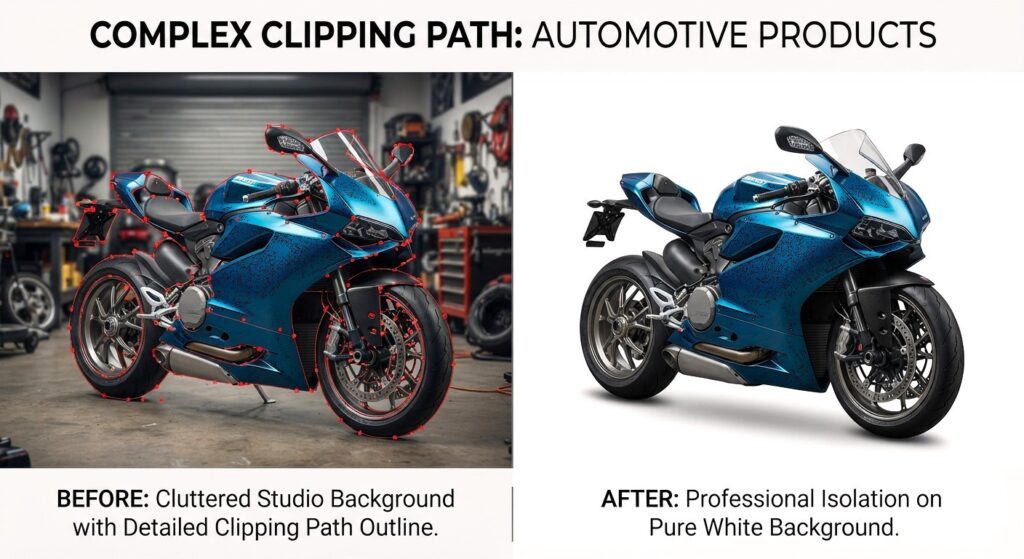
Automotive photography plays an important role in how customers discover, compare, and purchase vehicles and automotive products. Whether a business sells cars, motorcycles, vehicle accessories, spare parts, tires, alloy wheels, or automotive equipment, high-quality product images can make a significant difference in how customers perceive its products. Clear, attractive, and professionally edited images help businesses establish trust, communicate product details, and create a consistent brand identity.
However, automotive products often present unique image-editing challenges. Vehicles have complicated contours, curved body panels, transparent windows, reflective surfaces, intricate wheels, mirrors, headlights, and other detailed components. Removing or changing the background around these objects requires more than a simple automatic selection tool. It requires accuracy, patience, and professional editing techniques.
This is where complex clipping path for automotive products becomes especially valuable. It allows image editors to isolate vehicles and automotive components from their original backgrounds while preserving their natural shapes, fine details, and realistic appearance.
In this comprehensive guide, we will explore what complex clipping paths are, why they matter in automotive photography, how the process works, and how businesses can benefit from professional clipping path services.
What Is a Complex Clipping Path in Automotive Image Editing?
A clipping path is a closed vector path created around an object using professional image-editing software, usually Adobe Photoshop. The path identifies the exact boundary of a product so that the object can be separated from its original background.
A standard clipping path works well for products with relatively simple outlines, such as boxes, books, or basic household items. Automotive products, however, frequently contain complicated shapes and multiple individual components. Their outlines may include smooth curves, narrow gaps, sharp corners, rounded edges, and overlapping details.
A complex clipping path involves creating multiple carefully controlled paths to isolate these challenging areas accurately.
For example, when editing a photograph of a car, an editor may need to trace:
• The complete outer body of the vehicle
• Side mirrors and door handles
• Front and rear bumpers
• Headlights and taillights
• Windows and windshield areas
• Alloy wheels and individual tire shapes
• Side skirts and spoilers
• Gaps between vehicle components
The objective is to maintain the original product’s appearance while creating a clean and professional separation between the vehicle and its background.
Why Automotive Products Require Complex Clipping Paths
Automotive products are not always easy to isolate. Even a vehicle photographed against a plain background can contain challenging edges that require detailed manual editing.
1. Complicated Vehicle Shapes
Cars, motorcycles, and other vehicles have different body structures. Their outlines include curved roofs, sloping windshields, wheel arches, bumpers, mirrors, and other irregular shapes.
A basic selection tool may fail to follow these contours accurately. Manual path creation allows editors to control the boundaries more precisely.
2. Detailed Wheels and Tires
Vehicle wheels are among the most challenging automotive elements to edit. Alloy wheels often contain multiple spokes, circular openings, and complex internal shapes.
Professional editors must carefully follow the outer tire boundary and, when necessary, create additional paths around the openings between spokes. This helps prevent unwanted background areas from remaining inside the selected object.
3. Reflective and Glossy Surfaces
Automotive products frequently feature polished metal, glass, chrome, and glossy painted surfaces. These materials can reflect surrounding objects, lights, and environmental colors.
Although clipping paths define object boundaries, they do not automatically correct reflections or improve surface quality. Editors may need additional retouching techniques to achieve a polished final result.
4. Small and Intricate Components
Automotive accessories and spare parts can contain numerous small details, including screws, brackets, connectors, wires, and narrow openings.
Accurate paths help preserve these details without cutting away important sections or leaving unwanted background pixels.
5. Transparent and Semi-Transparent Areas
Vehicle windows, windshields, and certain plastic components may require special treatment. A clipping path can define the overall object boundary, but transparent or partially transparent details may need additional masking techniques to preserve realistic transparency.
Common Automotive Products That Benefit from Complex Clipping Paths
Complex clipping paths are useful for many different categories of automotive products. Businesses can use them to prepare images for online stores, digital advertising, printed catalogs, marketplaces, and promotional campaigns.
Cars and Passenger Vehicles
Car manufacturers, dealerships, automotive marketplaces, and vehicle retailers often need clean product images for websites and advertisements.
Professional editing can isolate the complete vehicle and place it against a white, transparent, or customized background.
Important areas include:
• Vehicle body outlines
• Windows and windshields
• Headlights and taillights
• Tires and alloy wheels
• Mirrors and door handles
• Front and rear bumpers
Motorcycles and Scooters
Motorcycles contain many exposed mechanical components. Their structures include handlebars, mirrors, wheels, brake discs, exhaust pipes, seats, and frame sections.
These details make accurate path creation particularly important. A carefully constructed path helps preserve the motorcycle’s original appearance while removing distracting backgrounds.
Automotive Spare Parts
Automotive spare parts are another important category. Online retailers sell thousands of individual components, and each product needs clear, consistent photography.
Examples include:
• Brake discs and brake pads
• Engine components
• Radiators and cooling systems
• Air filters and oil filters
• Batteries and electrical components
• Suspension parts
• Exhaust systems
• Automotive sensors and connectors
Some parts have simple outlines, while others contain complicated structures with multiple openings and irregular edges.
Tires and Alloy Wheels
Tires, rims, and alloy wheels often require accurate circular paths. Editors must maintain the correct proportions and preserve the spaces between wheel spokes.
These images are especially important for online stores that allow customers to compare different wheel designs, sizes, and finishes.
Automotive Accessories
Businesses selling vehicle accessories can also benefit from professional clipping paths.
Common products include:
• Seat covers
• Floor mats
• Steering wheel covers
• Roof racks
• Car organizers
• Vehicle lighting accessories
• Car audio systems
• Exterior styling accessories
Cleanly isolated images help customers understand each product’s shape, design, and features.
How the Complex Clipping Path Process Works
Professional automotive clipping path editing generally involves several steps. The exact workflow depends on the product, image quality, and required output.
Step 1: Image Assessment
The editor first examines the original photograph to understand its complexity.
During this stage, the editor identifies:
• The main automotive product
• The shape and condition of its edges
• Complicated curves and corners
• Internal openings and gaps
• Transparent or reflective areas
• Areas requiring additional masking or retouching
This assessment helps determine the most appropriate editing approach.
Step 2: Creating the Main Path
The editor uses the Pen Tool in Adobe Photoshop to create an outline around the primary object.
Instead of relying entirely on automatic selection, the editor manually places and adjusts anchor points to follow the product’s natural contours.
The goal is to create a smooth, accurate path without cutting into the product or including unnecessary background areas.
Step 3: Adding Subpaths and Internal Details
Automotive products often contain multiple openings and complicated sections. Additional subpaths may be necessary to separate these areas.
For example, a car’s alloy wheels may contain several spaces between spokes. The editor can create internal paths to remove unwanted background from these openings when the required output calls for it.
Step 4: Refining Curves and Edges
After the main path is created, the editor reviews its accuracy.
Anchor points and direction handles are adjusted to produce smooth curves around rounded vehicle components. Sharp corners are refined without creating unnatural bends.
This stage is important because inaccurate paths can make a vehicle appear poorly cut out.
Step 5: Removing or Replacing the Background
Once the path is complete, it can be used to isolate the automotive product.
The background can then be:
• Removed to create a transparent image
• Replaced with a pure white background
• Changed to a custom brand background
• Prepared for a promotional design
• Converted into a consistent catalog background
The appropriate background depends on the intended use of the image.
Step 6: Additional Image Retouching
Clipping paths primarily control the selection of the product. They do not automatically correct every photographic imperfection.
Additional editing may be required to improve the final image.
This may include:
• Removing dust, scratches, or unwanted marks
• Correcting brightness and contrast
• Adjusting color balance
• Improving surface appearance
• Removing distracting reflections where appropriate
• Enhancing sharpness and clarity
Step 7: Final Quality Inspection
Before delivery, the editor checks the image at different zoom levels.
The final inspection should identify unwanted background pixels, rough edges, missing components, accidental cuts, and inconsistent image proportions.
The file is then exported in the format and dimensions required by the client.
Manual Clipping Path vs. Automatic Background Removal
Automatic background removal tools have made basic image editing faster. They can be useful for simple product photographs, but they do not always provide the precision required for complex automotive images.
Manual clipping paths and automatic background removal serve different purposes.
| Comparison | Manual Clipping Path | Automatic Background Removal |
|---|---|---|
| Edge control | Detailed manual control | Algorithm-based selection |
| Complex shapes | Suitable for intricate outlines | May struggle with complicated details |
| Internal openings | Can be handled with additional paths | Results may vary |
| Consistency | Can follow specific editing instructions | Depends on the tool and image |
| Human quality review | Can include direct manual inspection | Often requires additional correction |
| Best use | Detailed product isolation | Fast processing of simpler images |
For professional automotive catalogs, accuracy and consistency are often more important than processing speed alone.
A practical workflow may also combine manual clipping paths, image masking, and other editing techniques when a product contains transparent or complicated visual details.
Benefits of Complex Clipping Path Services for Automotive Businesses
Professional clipping path editing can improve more than the appearance of individual product photographs. It can support broader marketing, sales, and brand consistency goals.
1. Professional Product Presentation
Cleanly isolated automotive products look more organized and visually appealing. Removing distracting backgrounds helps customers focus on the vehicle or component.
This is particularly useful for dealerships, automotive manufacturers, and online retailers that want to present their products professionally.
2. Consistent E-Commerce Product Images
Consistency is essential when an online store displays hundreds or thousands of automotive products.
Using similar background styles, image dimensions, and product positioning helps create a more organized shopping experience.
A consistent catalog also makes it easier for customers to compare products.
3. Better Marketing and Advertising Designs
Isolated automotive images can be used in promotional banners, social media advertisements, website graphics, brochures, and printed catalogs.
Designers can place products against different backgrounds without needing to photograph them again for every campaign.
4. Improved Visual Focus
Distracting backgrounds can take attention away from important product details. A clean background helps viewers concentrate on the vehicle’s design, shape, and features.
This can be particularly useful when promoting premium vehicles, custom alloy wheels, or specialized automotive accessories.
5. Greater Flexibility for Graphic Designers
Once a product has been professionally isolated, designers can use it in different layouts and marketing materials.
The same edited image can support:
• Website product pages
• Online marketplace listings
• Digital advertisements
• Social media posts
• Email marketing campaigns
• Automotive catalogs
• Promotional brochures
6. More Efficient Large-Scale Editing
Automotive businesses often work with large image collections. Outsourcing specialized editing can help internal marketing and design teams concentrate on other responsibilities.
A professional service provider can also follow established instructions to maintain consistency across multiple batches.
Common Mistakes to Avoid in Automotive Clipping Path Editing
Even small editing errors can make an automotive product look unnatural. Businesses should understand common problems when selecting a clipping path provider or reviewing edited images.
1. Rough or Uneven Edges
A poorly created path can produce jagged outlines, especially around curved body panels and wheel arches.
The editor should carefully adjust anchor points and inspect the edge quality at high magnification.
2. Cutting Away Important Details
Incorrect selections may remove small but important components, such as mirrors, antennas, handles, or parts of an automotive accessory.
A final comparison with the original image helps identify missing details.
3. Leaving Background Fragments
Small areas of the original background may remain around complicated parts or between wheel spokes.
These fragments can become especially noticeable when a product is placed against a contrasting background.
4. Creating Unnatural Curves
Too many anchor points or poorly positioned control handles can create uneven curves.
Professional path creation requires a balance between precision and simplicity.
5. Ignoring Shadows
Removing the background does not mean that every shadow should also be removed.
Natural shadows can help an automotive product look realistic. Depending on the required design, editors may need to preserve the original shadow, recreate it, or add a suitable contact shadow.
6. Using the Wrong Output Format
The final file format should match the intended application.
For example, transparent PNG images are useful for many digital design projects, while JPEG files are commonly used for product photographs with solid backgrounds. Layered PSD files may be appropriate when further editing is expected.
How to Choose the Right Automotive Clipping Path Service Provider
Not every photo editing provider has the same level of experience with complex automotive images. Businesses should evaluate a service provider carefully before outsourcing large projects.
Consider the following factors:
• Relevant portfolio: Review examples involving cars, motorcycles, wheels, and intricate automotive components.
• Edge accuracy: Check whether the provider can create smooth curves and clean outlines without damaging product details.
• Manual editing capabilities: Confirm that the team can handle detailed paths rather than depending entirely on automated selection tools.
• Quality control: Ask how edited images are inspected before delivery.
• Bulk image capacity: Consider whether the provider can manage large batches while maintaining consistent quality.
• File format support: Check whether the service can deliver JPEG, PNG, PSD, or other required formats.
• Communication: Clear instructions, responsive communication, and revision support help avoid misunderstandings.
• Pricing and turnaround: Compare the cost and delivery schedule according to the actual complexity and volume of the project.
A useful approach is to provide a small sample batch first. This allows the business to evaluate the editing quality and confirm that the final output meets its requirements.
Why Professional Clipping Path Editing Matters for Automotive E-Commerce
Online shoppers cannot physically inspect automotive products before making a purchase. They depend heavily on photographs to understand product design, appearance, and details.
A poorly edited image may create confusion or reduce confidence in a product listing. On the other hand, a professionally presented photograph can help customers examine the product more easily.
Automotive e-commerce businesses should consider the following image presentation practices:
• Use clean and consistent backgrounds across product categories.
• Display products with appropriate image resolution.
• Maintain accurate product colors and natural proportions.
• Avoid removing essential design features during editing.
• Use multiple product angles when necessary.
• Keep the product appropriately centered within the image.
• Ensure that edited photographs accurately represent the real product.
These practices can help create a more professional online shopping experience.
Why Choose Clipping Partner India for Automotive Image Editing?
Choosing an experienced photo editing provider is an important step for automotive retailers, manufacturers, dealerships, and e-commerce businesses. Professional editing requires attention to detail, consistent quality standards, and an understanding of different product shapes and image requirements.
Clipping Partner India provides professional image editing solutions for businesses that need clean, consistent, and carefully prepared product photographs.
Whether you are working with complete vehicle photographs, automotive accessories, spare parts, or other products, selecting the appropriate editing technique is essential.
Businesses looking for reliable professional clipping path services can explore different options for isolating products and preparing images for commercial use.
A professional workflow can help with:
• Accurate object isolation
• Detailed manual path creation
• Clean background removal
• Consistent product presentation
• Preparation of images for e-commerce
• High-quality editing for different marketing materials
For large automotive image collections, clear instructions and sample images can help establish the required editing standards before the full project begins.
Conclusion: Create Better Automotive Product Images with Complex Clipping Paths
Automotive product photography requires careful editing because vehicles and their components often contain complicated shapes, reflective materials, and intricate details. A simple background removal process may not provide the precision needed for professional commercial images.
Complex clipping paths offer a controlled way to isolate automotive products while preserving their original contours and important features. When combined with suitable masking, retouching, and background editing techniques, they can produce polished images for online stores, catalogs, advertisements, and other marketing applications.
For automotive businesses, investing in professional image editing is an effective way to maintain visual consistency, improve product presentation, and support a more professional brand image.
Whether you sell cars, motorcycles, spare parts, tires, or automotive accessories, carefully edited photographs can help your products stand out. Choosing an experienced clipping path service provider can make the difference between an ordinary product image and a clean, commercially ready visual.